Digital wedding invitation: the 4 formats, what each costs and how to send one
What a digital wedding invitation is, the four formats Filipino couples use, how to make one, and how to send it on Messenger or Viber so it previews right.
A digital wedding invitation is one your guests open on their phone instead of on paper: an image or PDF sent in chat, a video, a flip-book link, or an invitation website that also collects RSVPs. Filipino couples send it through Messenger or Viber. Choose the format by one question: do guests only need to see it, or also answer?
To see the website version on a phone, open the Piña sample invitation. Its menu is in Tagalog.
What counts as a digital invitation?
Anything guests receive on a screen. People search for it as an e-invitation, an e-invite, an online wedding invitation or a digital wedding card, and they all mean the same thing. The wording, the etiquette and the timeline are the same as for paper. What changes is how it reaches guests and what happens after they open it.
That second part is where the four formats split. An image, a video and a flip-book show your invitation. A website shows it and records who is coming.
What are the four formats, and what do they cost?
| Format | What guests get | RSVP | Price (checked Sept 2026) |
|---|---|---|---|
| Image or PDF in chat | A picture or file in the thread | Chat replies you tally by hand | ₱0 on Canva Free; Canva Pro is ₱300 a month |
| Video invite | An MP4, often about a minute, with music | Chat replies | ₱0 if you animate it yourself; Ink Scribbler from ₱5,950 |
| Flip-book | A link that turns pages like a booklet | Usually a link out to a form | Heyzine free for 5 flip-books; Ink Scribbler ₱3,950 on its own |
| Invitation website with RSVP | A link with the design, maps, details and a reply button | Recorded for you, per guest | Free tiers exist; Link of Time is ₱800 to ₱8,000 regular |
Website prices spread widely. At Link of Time's regular prices, the ₱800 Starter package gives you three personal links and an RSVP form that asks only for a name and attendance, on a fixed layout. A guest dashboard for tracking replies starts at the ₱1,200 Lite package, and meal preferences and plus-ones start at Standard, ₱3,500. Nuptl says its builder is free with a 50-guest RSVP cap and a ₱560 one-time upgrade. For a full cost comparison against printed cards, including delivery, see digital vs printed wedding invitations.
Image or PDF sent in chat
The cheapest format, and the one most couples try first. You design one page (or a set of pages for the entourage), download it, and send it.
It works well for small weddings and for couples who already talk to every guest one on one. Its weakness shows after you hit send. The details are frozen in the picture, so a changed venue means a new file and a second round of messages. Guests can't tap an address to open a map. And every "Yes po, attend kami!" lands in a different thread, which you copy into a spreadsheet yourself.
On file types, Canva's download guide lists PDF Standard at 96 dpi for screens and PDF Print at 300 dpi for printers. For chat, the screen version is enough. Event Nest recommends a PDF over a JPG on Messenger because it keeps the design sharper.
Video invite
A video set to your song is moving, but guests usually watch it once. When they need the church address on the wedding morning, they have to scrub through a minute of animation to find it.
Even a studio that sells them says so: Ink Scribbler's video listing recommends video for save-the-dates, with a flip-book or website for the full invitation. Its video is a one-minute MP4 of up to 7 scenes, and animation takes 7 to 10 working days after the static design is approved. If you make your own, Canva downloads designs with video and music as MP4.
Flip-book
A flip-book is your invitation PDF turned into pages that flip on screen, often with music and clickable links. It feels closer to a printed suite than a single image does, and it arrives as a link instead of a heavy file.
You can make one yourself by uploading a PDF to a flip-book site. Heyzine's free plan allows 5 flip-books with unlimited pages. A flip-book still doesn't know who is coming, so the RSVP is usually a button to a form.
Invitation website with RSVP
Guests open a link, see the invitation, and reply on the same page. The details stay live, so if the reception moves you edit one page and every guest sees the change.
The honest downsides: it takes an evening or two to set up, and a guest who wants a keepsake has nothing to print unless you also give them paper. Setup is covered in our wedding invitation website guide.
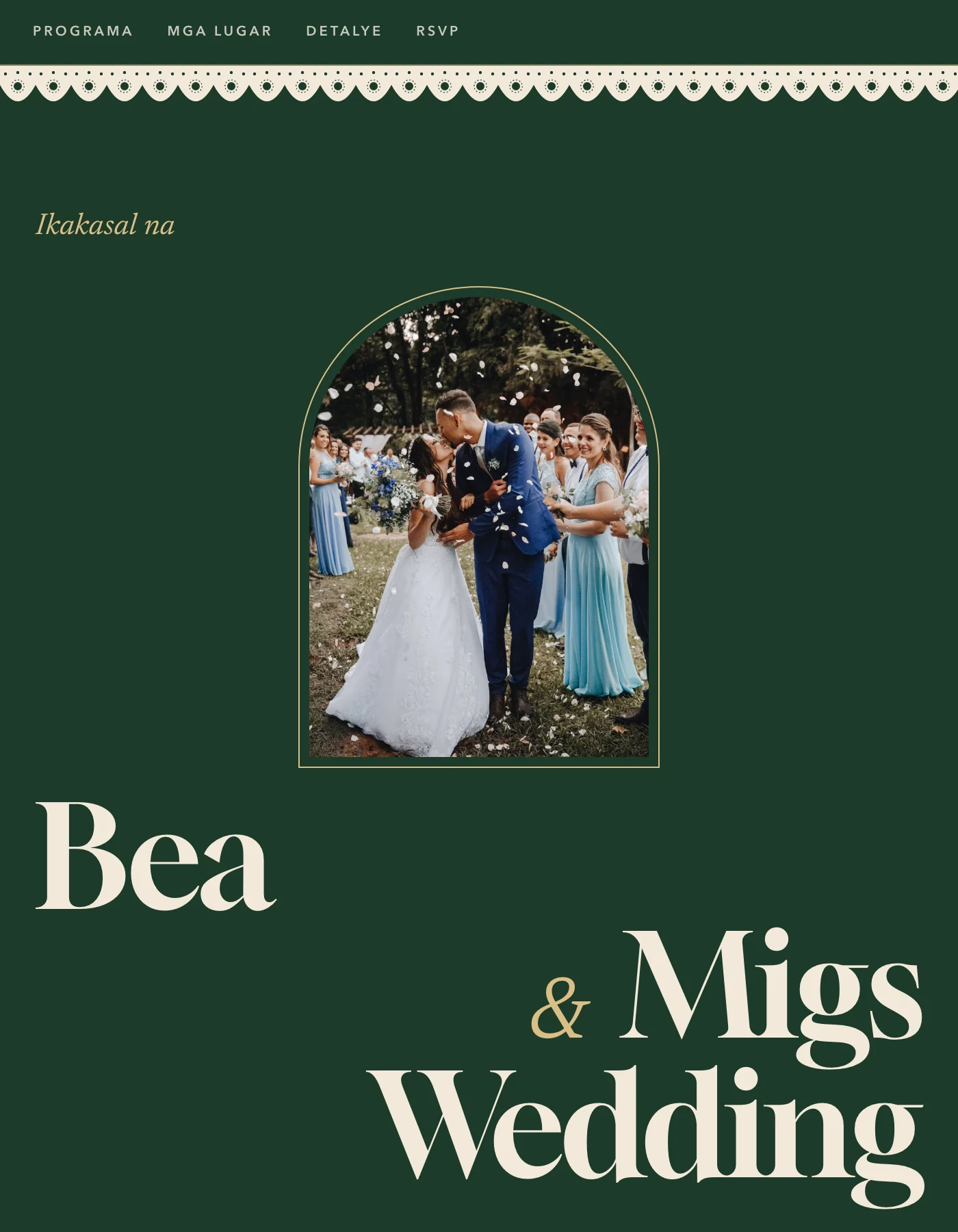
The Piña sample opens with "Ikakasal na" and a Tagalog menu. It uses demo names, not a real couple.
How do you make a digital wedding invitation?
A template takes a weekend. A designer takes longer: for its flip-book, Ink Scribbler quotes a week for the first draft, then 3 days per revision round. The steps are the same whatever tool you use.
- Collect the facts first: full names, date, ceremony venue and time, reception venue, dress code or motif, RSVP deadline, and the entourage if you're listing sponsors. Our invitation wording samples cover the order and the Tagalog and English phrasing.
- Pick the format from the table above. If you want a headcount without a spreadsheet, that's a website.
- Design for a phone held upright. Most guests will read it on a small screen. Large names, short lines, and no body text you have to pinch to read.
- Make the addresses tappable. In a website or flip-book, link each venue to its Google Maps pin. In an image, add the link in the message you send with it.
- Set the RSVP deadline 4 to 6 weeks before the wedding, and put it where guests see it without scrolling.
- Proofread with two people who didn't make it. Check the date against the day of the week, because a mismatch is easy to miss when you've read it fifty times.
- Test it on a cheap Android phone on mobile data. A laptop on Wi-Fi hides problems. A big video or a heavy flip-book that loads fine at home can stall on a prepaid data plan.
If you're building it in Canva, our Canva wedding invitation guide walks through the editor.
How do you send it on Messenger and Viber so it previews well?
Send it one household at a time, with a personal line first and the link on its own line at the end. Then check the preview card before anyone else sees it.
- Message each household privately. A group-chat blast reads like an announcement, and replies get buried under stickers. Event Nest's advice is the same: the personal message is what makes it feel like an invitation.
- Test the preview on yourself. Send the link to your own account or a sibling before anyone else. Check that the photo, names and date appear.
- Finish the cover photo before sending. The preview image is fetched from your page, and Meta's documentation says Facebook caches it by URL. If you change the photo afterwards, run the link through Meta's Sharing Debugger, which makes it read the page again.
- Send a link instead of a large file when you can. A link opens right away. A big video or PDF has to download first, on the guest's data.
- Send 10 to 12 weeks before the wedding, which leaves at least four weeks before the RSVP deadline.
A message that works in either app:
Hi Tita [Name]! Ikakasal na po kami ni [Partner] on [date]! Here's our invitation, with the church and reception details. Pa-RSVP na lang po by [deadline] para ma-finalize namin ang count with the caterer. Salamat po!
[link]
For reminders and follow-ups, see how to get guests to RSVP.
What about guests without a smartphone?
Plan for them from the start. They are mostly your oldest guests. Messenger ads reached the equivalent of 83.3 percent of Filipino adults at the end of 2025, per DataReportal, a count of Meta's ad audience rather than of active users. The gap sits with age. In the 2019 national ICT survey, only 59 percent of Filipinos 55 and older owned a cellphone, and 18 percent of those 65 and up had any of the six computer skills it measured, such as sending an email with an attachment (PIDS).
Four things that work:
- Print a small batch. Principal sponsors and elders usually get a printed card anyway, after you've asked them in person. The printed vs digital guide prices it.
- Send a text with the essentials. A basic phone can't open a link, but it reads SMS. Date, church, time, reception venue and your number fit in one message.
- Go through the family member who handles their phone. Send the link to the cousin or apo who already reads Lolo's messages to him, and ask them to reply for him.
- Call, then write the answer down in the same place as everyone else's. An RSVP taken by phone that lives only in your memory is how a lola ends up without a chair.
A QR code printed on the paper card lets the family scan it later for maps and updates. The guest without a smartphone still needs the text version.
Where Ceremo fits
If you only need guests to see a design, a free Canva image sent in Messenger is enough, and Heyzine will turn it into a flip-book for nothing. Ceremo is for couples who also want to know who is coming.
It's an invitation website where each household gets its own RSVP link. Paste it into a chat and the link preview opens with that household's name. Guests answer on the page without an account, and you get a notification when a household replies. Everyone sits in one list as Attending, Not attending, Maybe or Pending. When Lola answers by phone, you record it in the same list. Invitation emails and custom RSVP questions are free. A branded QR card for your printed batch is free too, and you can add photos of your printed invitation to the site so the sponsors' cards and everyone else's link match. Automated reminder emails to the guests who haven't answered are Premium.
Ceremo is free for up to 50 guests. Larger lists need Premium, a one-time ₱2,499, not a subscription. Try the invitation maker with one of the sample designs, and send the first link to yourself before you send it to Tita.
Frequently asked questions
What is a digital wedding invitation?
A digital wedding invitation is one guests receive on their phone instead of on paper. It comes as an image or PDF, a short video, a flip-book link, or an invitation website where guests can also RSVP. Most Filipino couples send it through Messenger or Viber.
Is it okay to send a digital wedding invitation in the Philippines?
Yes, for most guests. The usual exception is principal sponsors and elders, whom couples ask in person and give a printed card. A small printed batch for them and a digital invitation for everyone else is the common setup.
What is the difference between an e-invite and an invitation website?
An e-invite is a file, usually an image, PDF or video, that shows the design. An invitation website is a link that holds the design plus the details guests look up later, like maps and dress code, and it can collect RSVPs so you know who is coming.
Can I make a digital wedding invitation for free?
Yes. Canva's free plan lets you design an invitation and download it as an image or PDF, and some invitation websites have free tiers with RSVP. The free route costs time instead: you track replies yourself unless the tool records them.
How early should we send a digital wedding invitation?
Send it 10 to 12 weeks before the wedding and set the RSVP deadline 4 to 6 weeks before the day. Digital invitations arrive instantly, but guests still need time to plan, and your caterer needs the count.